Posts

Performance Counters for .NET

A little dated by now. From Windows 2000 Resource Kit: http://technet.microsoft.com/en-us/library/cc938609.aspx http://technet.microsoft.com/en-us/library/cc940375.aspx http://technet.microsoft.com/en-us/library/cc938586.aspx http://technet.microsoft.com/en-us/library/bb734903.aspx For .NET http://www.symantec.com/business/support/index?page=content&id=HOWTO9722 From Windows 2003: http://technet.microsoft.com/en-us/library/cc779038(WS.10).aspx
Cookie, Security, OWASP

We just had a Security Assessment for our web applications. Some points of interest follows: Cookie XSS security: Where possible, all cookies should be configured to be httpOnly . This is to prevent client-side scripts or applets from accessing the cookie. Incidentally, this is the default for ASP.NET session cookie and cannot be changed via httpCookies element in Web.Config: <httpCookies httpOnlyCookies="true"/> Prevent MITM from accessing the session: Ensure that the session cookie is delivered over secured HTTP session (TLS). Setting the cookie as secure d indicates to the browser that the cookie should only be sent over a secured channel. To configure the httpCookies element: <httpCookies requireSSL="true" /> Note that Forms and Session cookies have slightly different behaviour with Forms cookie being more secured and more configurable. Interestingly, setting requireSSL to true for Forms cookie mandates that the communication channel to ...

How to put up Maintenance Page for ASP.NET Web Application in IIS

Put in a static file named app_offline.htm in the root of the site. Afterwhich, all requests for that site will be served from this file. Technically, what happens is that the entire application domain will be stopped and unloaded, all without performing an IIS reset. Note the following caveats: Any error in the Web.Config may result in the app_offline.htm page not showing up! The file (app_offline.htm) must be of at least 512 bytes for it to take effect for IE browser. Otherwise, IE would display a “Friendly Error" message by default. The effect of this file is that the server will serve out a HTTP response bearing this header: HTTP/1.1 503 Service Unavailable

Internet Explorer Compatibility View

The newer Internet Explorer comes with the F12 Developer Tools wherein you find the Browser Mode and the Document Mode. Difference between the Browser Mode and the Document Mode Document Mode is something that the web server can control. By specifying the HTTP header, the HTML meta-tags, or the DocType declaration, the Document Mode changes accordingly. See my earlier article . However, the Browser Mode cannot be changed by the server. What really happens when IE Compatibility View is activated? when IE Compatibility View is activated, the HTTP user-agent header is changed to that of IE7. The user-agent sent by the browsers follows: IE Browser Mode User-Agent IE10 Mozilla/ 5.0 (compatible; MSIE 10.0 ; Windows NT 6.1; Trident/6.0) IE9 Mozilla/ 5.0 (compatible; MSIE 9.0 ; Windows NT 6.1; Trident/5.0) IE8 Mozilla/ 4.0 (compatible; MSIE 8.0 ; Windows NT 6.1; Trident/4.0) IE7 Mozilla/ 4.0 (compatible; MSIE 7.0 ; Windows NT 6.1) IE10 WinPhone Mozilla/ 5.0 (comp...

How to Display/ Load Videos in Browsers

Here is everything you need to know about videos: http://diveintohtml5.info/video.html Considerations In general, these are the considerations when displaying/ rendering videos over the web: where is the video stored/ hosted? – On premise or in the cloud? Cloud-hosting can be a good option for load distribution if the videos are huge. what is the streaming/ downloading protocol? – The trend these days appears to be to stream videos using HTTP rather than specialised (and often expensive) protocols. who is the target audience and what browser/ platform are they using to view these videos? what browser? – Chrome, IE, Firefox, Opera? which version(s)? – still required to support IE6? what operating systems/ environment? – do we have Unix/ Mac users? need to support desktop/ tablet/ mobile? – some or all of these? The challenge for the 3rd consideration is to be able to accommodate everyone (from IE6 on a desktop to the iPad safari browser). To do this, a number of “t...

2-Way SSL for WCF Web Service Hosted on IIS

I recently was involved in getting the above to work in our environment. The steps follows: Ensure that the SSL certificates are correctly signed Ensure that the SSL certificate chain is present and valid Install the certificates in the “Current User” account for validation Execute mmc.exe, add “Certificates” snap-in with “My user account” Install the certificate within “Personal” store Verify by using Internet Explorer to retrieve the WSDL from the remote web service If the certificate and chain are correct, Internet Explorer will validate them and report so with “Certificate is OK” Install the certificates (and the entire chain) in the “Local Computer” account Execute mmc.exe, add “Certificates” snap-in with “Computer account” Install the certificate within “Personal” store Note the thumbprint of the certificate Configure the WCF web.config to make use of “Client Certificates” by finding the certificate within the “LocalMachine” using the thumbprint (remove the spac...

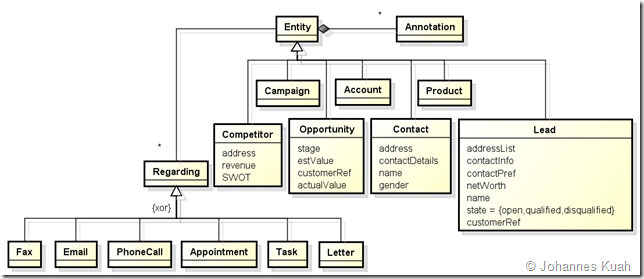
Microsoft CRM Main Concepts & Relationships

Image
I came across MS CRM while searching for a solution for leads management. In the process of trying to appreciate the main concepts and relationships as well as a basic gap analysis against our requirements, I created a set of UML class diagrams to document my understanding. The following are the main concepts (or entities, according to CRM’s nomenclature): Main CRM entities Sales Force entities Sales Person entities Activity entities Teaming entities Campaign entities Main CRM entities Sales Force entities Sales Person entities Activity entities Teaming entities Campaign entities Web References Some useful links for read-up: http://crmdynamo.com/2008/06/crm-40-concepts-what-are-leads-contacts-and-opportunities/ http://blogs.msdn.com/b/crm/archive/2007/08/27/leads-accounts-contacts-and-opportunities.aspx