Posts

Showing posts with the label mindmap

Useful Hacks in Using Astah

Image
MindMap Hack I've been using Astah (download here ) more recently for the MindMap feature and felt to share this wonderful "hack" with you. I jotted some points in NotePad and wish to quickly transfer them into Astah as a MindMap. The easiest way to retain the hierarchy is to use [TAB].  Therefore I could easily transform this Hierarchical List of Points Into Same List of Points in MindMap Here is how it's done: Select all text in NotePad (or equivalent) and Copy (Ctrl-C) Go to Astah and create a New MindMap Diagram Click on Mindmap0 or whatever existing topic and Paste (Ctrl-V) Like magic, the MindMap is created and the hierarchy is retained. UML Deployment Diagram You wish to draw professional-looking diagrams using AWS/ Azure icons. Is that possible & easy to do in Astah? AWS Deployment Believe it or not, the above is drawn in Astah!  Here is how it's done: Go to Tools -> Project Settings -> Set Icon for Stereotype (See Custom Icons for Stereotypes Di...
Astah - How wonderful you are!

Image
I started using JUDE in the early days of UML modelling and have continued using Astah until now. In the day and age of Agile development, emphasizing "communication over documentation", is UML (and related UML tools) still relevant? I'll give a resounding YES! to the question. While we should do away with extensive documentation , we should still be able to communicate our intent in forms of architecture, design, workflow, processes, etc. In the course of my work in an end-user environment, I use Astah extensively to communicate with development teams, users, vendors and even senior management.  I find it's often a lot easier to use a tool like Astah to draw UML (or pseudo-UML) diagrams than pen-and-paper (or even napkins!). For instance, I can easily move things around, redraw and append/ update the diagram using the tool but not with paper. Some examples of diagrams I'd used in the course of work are below. I used Astah for the following: Share my thought proc...

Prototype Application Development Using Astah

Image
I had the opportunity to develop a prototype for a client and used Astah to capture the salient specifications as well as the requirements analysis. Mindmap To first understand the requirements, I used a mindmap to guide the user through the mean features of the application. What worked well in this instance was a role-based model (similar to use case modelling), i.e. list out all the roles involved in interacting with the application. Next, the features or use cases for each role gets listed out (“as a <role>, I want to be able to <feature>”) The final mindmap served as a form of an agreement on the scope of work. The final mindmap looked like the following:   Use Case Modelling Using Astah, I was able to easily convert the Mindmap into a set of Actors and Use Cases for further analysis. The model follows:   Domain Model As the prototype had dependencies on an existing application, some of the domain objects were deliberately taken from the the exi...

Review: High Impact Middle Manager

Image
A mindmap review of salient aspects of this book. Flash version can be found here

Review: PowerSpeak

Image
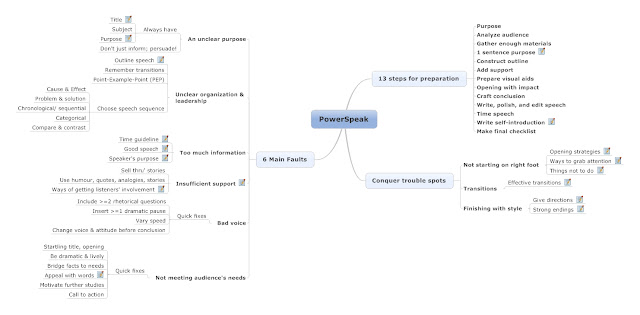
A mindmap review of this book. Flash version can be found here

Review: The Technology Garden

Image
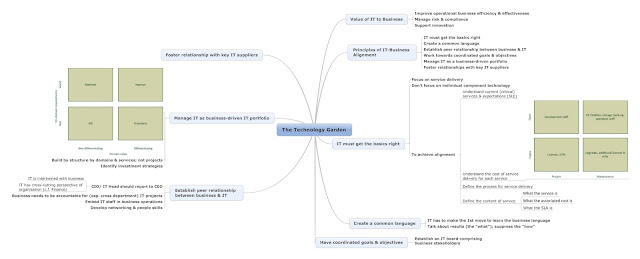
A mindmap review of this book. Flash version can be found here

Review: Agile Practices

Image
A mindmap review of a book on agile practices. Flash version can be found here

Review: Peter Principle

Image
A mindmap review of this humorous book. Flash version can be found here

Review: Myth of Multitasking

Image
A mindmap review of this book. Flash version can be found here

Review: Leadership is an Art

Image
A mindmap review of this book. Flash version can be found here

Review: Carrot Principle

Image
A mindmap review of this book. Flash version can be found here

Review: Agile Practices

Image
A mindmap review of a book abour Agile Practices. Flash version can be found here