Posts

How to Display/ Load Videos in Browsers

Here is everything you need to know about videos: http://diveintohtml5.info/video.html Considerations In general, these are the considerations when displaying/ rendering videos over the web: where is the video stored/ hosted? – On premise or in the cloud? Cloud-hosting can be a good option for load distribution if the videos are huge. what is the streaming/ downloading protocol? – The trend these days appears to be to stream videos using HTTP rather than specialised (and often expensive) protocols. who is the target audience and what browser/ platform are they using to view these videos? what browser? – Chrome, IE, Firefox, Opera? which version(s)? – still required to support IE6? what operating systems/ environment? – do we have Unix/ Mac users? need to support desktop/ tablet/ mobile? – some or all of these? The challenge for the 3rd consideration is to be able to accommodate everyone (from IE6 on a desktop to the iPad safari browser). To do this, a number of “t...
2-Way SSL for WCF Web Service Hosted on IIS

I recently was involved in getting the above to work in our environment. The steps follows: Ensure that the SSL certificates are correctly signed Ensure that the SSL certificate chain is present and valid Install the certificates in the “Current User” account for validation Execute mmc.exe, add “Certificates” snap-in with “My user account” Install the certificate within “Personal” store Verify by using Internet Explorer to retrieve the WSDL from the remote web service If the certificate and chain are correct, Internet Explorer will validate them and report so with “Certificate is OK” Install the certificates (and the entire chain) in the “Local Computer” account Execute mmc.exe, add “Certificates” snap-in with “Computer account” Install the certificate within “Personal” store Note the thumbprint of the certificate Configure the WCF web.config to make use of “Client Certificates” by finding the certificate within the “LocalMachine” using the thumbprint (remove the spac...

Microsoft CRM Main Concepts & Relationships

Image
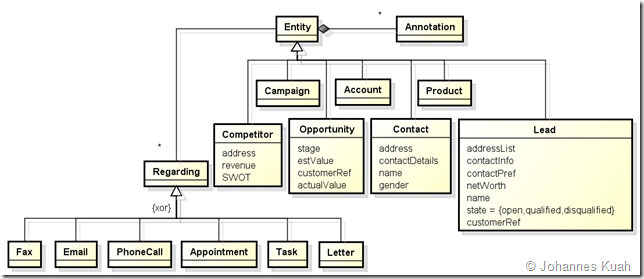
I came across MS CRM while searching for a solution for leads management. In the process of trying to appreciate the main concepts and relationships as well as a basic gap analysis against our requirements, I created a set of UML class diagrams to document my understanding. The following are the main concepts (or entities, according to CRM’s nomenclature): Main CRM entities Sales Force entities Sales Person entities Activity entities Teaming entities Campaign entities Main CRM entities Sales Force entities Sales Person entities Activity entities Teaming entities Campaign entities Web References Some useful links for read-up: http://crmdynamo.com/2008/06/crm-40-concepts-what-are-leads-contacts-and-opportunities/ http://blogs.msdn.com/b/crm/archive/2007/08/27/leads-accounts-contacts-and-opportunities.aspx

HTTP over TLS/ SSL: What is Really Secured?

HTTP over TLS/ SSL performs encryption of transferred data. However, what is really encrypted and what isn’t? Part of the TLS/ SSL negotiation will not be secured. Everything else is securely transmitted. What is in the clear/ can be derived will be the destination hostname or IP address and the port (usually 443) URLs for GET/ POST/ HEAD request methods are secured GET URL parameters, e.g. ?data=12345678&id=123 POST URL All HTTP headers are secured. These include: Cookies Content-type/ content-length Cache control User-agent Accept (-encoding) HTTP payload is secured. This may be: POST parameter HTML/ XML data Does it therefore mean that the GET URL over HTTPS is secured? You decide for yourself…. As the GET URL method information is secured, any sniffer between the source and destination would not be able to “see” the URL parameters. However, the web browser would track the full GET URL (including the parameters) in the browsing history. As such, anyone havi...

How to Send an iCal File as an Exchange Appointment

Creating an iCal is rather straightforward, so is sending out an email with the iCal file attached therein. What is required in our case is to automate sending out an appointment thru’ MS Exchange in a way that it behaves as though an appointment has been manually sent by someone thru’ Exchange. This would mean that the appointment has to appear in the Exchange Calendar whether or not the recipient remembers to accept the appointment. This is not possible with a typical iCal sent as an attachment in an email as the recipient would need to open the iCal file and save it before it appears in the Exchange Calendar (sort of an import function). Apart from making use of Exchange API, a much simpler solution would be to (still) send the iCal as an attachment in an email but “trick” Exchange into recognising the mail as an Exchange appointment. Credits to this website for first uncovering the solution. First and foremost, understand the difference between an Appointment and a Meeting Reques...

National Do-Not-Call Registry (Singapore)

Information regarding the proposed National DNC registry can be found here . The DNC registry allows individuals to opt-out of marketing messages in the forms of email , SMS/ MMS, faxes, phone-call. A message is regarded as a marketing message as long as it is determined that part of the message has a purpose which is marketing in nature as defined . Messages that are marketing in nature if one of the purposes of the message is: to offer to supply, advertise or promote goods or services , the suppliers or prospective suppliers of goods and services to supply, advertise or promote land, interests in land, business or investment opportunities

Poor Man's SSO with Multiple ASP.NET Web Applications

It is quite straightforward to have (poor man's) single sign-on for multiple ASP.NET web applications without sourcing for an enterprise solution. Based on the following premise: assuming the web applications are in the same domain  forms or custom authentication is used for the web application In order to have things work, a couple of steps are required, namely: Enable Forms authentication for the relevant web applications, use: < authentication mode = " Forms " > Ensure that the validationKey and decryptionKey settings (under the machineKey element) are not auto-generated but are explicitly coded and shared across the relevant web applications (and web farm, if applicable). For IIS6, you can use this website to generate the keys For IIS7+, you can use IIS Manager to do so . Customise the name of the cookie (instead of the default .ASPXAUTH) but more importantly, set the cookie path to the default root "/" and the domain to a valid one,...